


Tracker Video Analysis
Some of you may have come across this at a few Oide events this year, but I thought it was worth sharing here - not least because it's a free, open-source, non-commercial resource, and the more of them we have the better!
Kudos to Doug Brown for creating this. I understand he is a teacher in the underappreciated US Community College system, in Cabrillo College in California.
Essentially, the software allows you to create graphs directly from video. The homepage is here: Tracker Video Analysis and Modeling Tool for Physics Education
The homepage includes a video guide that I found straightforward enough to go from zero knowledge to being functional in half an hour.
The key steps seem to be:
Make a video, typically using a phone.
I was setting out to confirm the conservation of energy so I filmed this toy car converting potential to kinetic energy. I did so from an awkward angle and meant to go back and do it again.
But I haven't got around to that yet. I'm beginning to suspect I never will.
Upload to Tracker.

Select the start and end points of the relevant section of the video.

Select the ruler, which gives scale to the video. This defaults to 1 m, but you can set it. Here I set it to 0.74 m - the height of the table.

Insert the x-and-y axes - which can be changed to more visible colours. And the origin can be dragged to any convenient point.

Let the software know what object you're tracking.
Here, I was tracking the toy car. So I clicked on that object, and then the video jumps forward a few milliseconds and you click again and repeat several times. This creates a graph of sorts over the video...

7.... and also creates more formal graphs off to one side.

You can click the x- and y- labels to change to any one of dozens of variables.

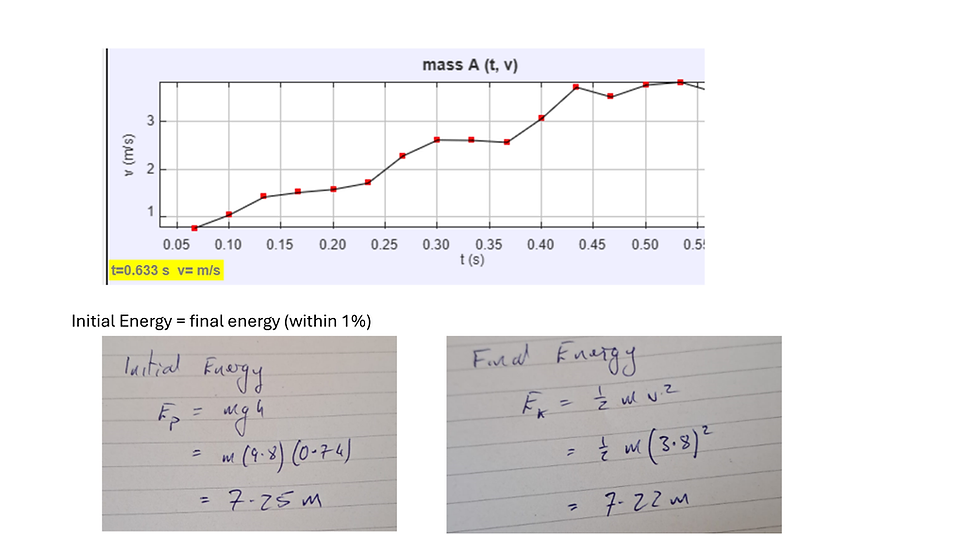
I was just looking to track the change in velocity, so I selected v. Creating this graph.
The wobbles don't look impressive, and some of that is down to me working too fast and without due care. But also, the track actually did wobble, so its not as bad as it looks at first. And I realised that in terms of conservation of energy, that really shouldn't matter. And as the results show, it worked quite well, confirming the conservation of energy within 1%.
Again: links here: Tracker Video Analysis and Modeling Tool for Physics Education


Comments